JuLi WebApp
Design Engineering
Prologue
"Junge Liberale"
My mission
Junge Liberale (JuLis) is the political youth org of FDP, the liberal party in Germany.
I'm part of the federal board of Junge Liberale and responsible for innovation projects (like this one) and IT in general.
Let's automate the busywork so we can focus on doing politics.

Act 1
Finding the right arguments
The problem
600+ resolutions hold every position we've ever taken.
And none of it is searchable in the moment a member needs it. So I built a chat that answers in our voice and cites the exact resolutions behind every claim.
Groundwork
Creating semantic chunks
The foundation for the chatbot is a huge database of 30k chunks out of the 600+ resolutions. Every semantic chunk is one demand, goal or factual claim. With the help of an LLM, I assigned keywords and a type that helps me generate an accurate answer.
The chunks database
"resolution": "Make Verteidigung European Again!",
"chunk": "Die Europäische Union soll eine Strategie zur Ausgabe und Durchsetzung eigener Sicherheitsgarantien erarbeiten.",
"keywords": "Verteidigung, EU, Sicherheitsgarantien",
"type": "demand"
Chatbot Pipeline
Step 1
Turning the question into keywords
Every question gets assigned a few keywords, with which the chunks are searched.
Step 2
There are two reasons for ranking the resolutions:
Decisions may contradict one another. In such cases, the following applies: A decision made by a higher-level decision-making body takes precedence over one made by a lower-level body. Also, more recent decisions take precedence over older ones.
I don't want to pollute the context with resolutions that contain the keyword once.
After ranking by relevance (percentage of chunks containing the keywords in a given resolution) and decision-making body/recency, the top 5 resolutions are used in context.
Step 3
Answer in our style
The question, the relevant resolutions and tone of voice are given to an LLM a second time. The prompt now is to answer the question given by the user with the context provided.
The solution
Act 2
How to design for social media (fast)
The problem
Volunteers don't have time…
…and only a handful are professional designers. That's why especially local subdivisions improvise a lot. The impact: we don't post as much as we should and most posts drift off-brand.
The solution
Design your posts in no time
With this interface, new single posts can be designed in under a minute. Just add a caption (more on that later) and they are ready to publish.
Mobile redesign
The mobile experience needed to be different (duh).
I created a bottom menubar that splits up the options to 5 tabs. The post stays always visible and gets smaller when a tab is selected (instead of disappearing).
Plugging it into the chatbot
Because why not.
After finishing both the chatbot and the post generator I realized that I could also combine the two and create something even more magical: A prompt to post design pipeline.
Post Generation Prompt
verbal style guide
context from resolution corpus
output instructions
JSON-Output of the LLM
{
"title": "Mehr Chancen. Weniger Bürokratie.",
"subtitle": "Für eine Generation, die liefern will.",
"style": "rectangle-top",
"image": "work",
"color": "white",
}
Post

Act 3
Building in the age of AI
My approach
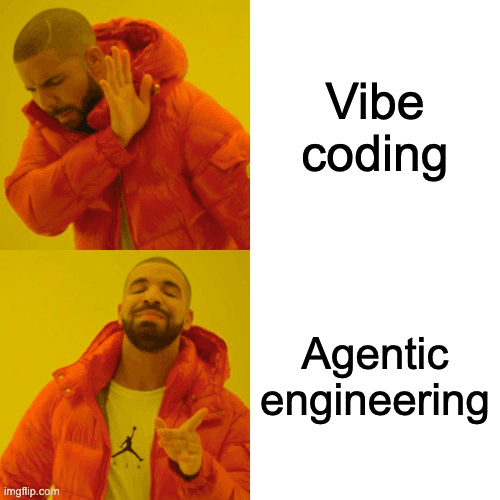
Quick and dirty first.
Version 1 was completely vibe-coded. The code was fast and fragile, built to throw away. That's the right approach when you don't know where you're headed yet. I tested features fast, held everything together with duct tape, and got something working in front of people.
Shipping production ready second.
The current version has real architecture underneath it. The code is typed end to end. The three products have clean separation between them. The system is secure and maintainable. I built it from scratch, applying the lessons from version 1.
Tools
The holy trinity of my new design process

Figma
From quick idea to wireframes to design systems: Figma is where every concept comes to life on a canvas.

Claude
This is where work gets done: market research, identifying opportunities, building new features and fixing bugs.

Cursor
LLMs are just not there yet. I need an IDE to push the last pixels token-efficient with human intelligence.
None of these tools wrote the web app on their own. They took care of the parts that were never really the hard part.
The hard part was figuring out what the resolution pipeline should look like, how to verify the answers of the chatbot, how to chunk resolutions without losing the context while still making them searchable, and where semantic search helped versus where it just sounded confident while being wrong. And I really love solving these hard problems.
Tech Stack
Next.js 16
React 19
TypeScript
Tailwind v4
Supabase / Postgres
OpenRouter · Gemini
TanStack Query
Zustand
Nothing to see here. You know what these do.
Reflection
This was the first project where I noticed I had been thinking too small the whole time. So much more is possible than I assumed going in, and this project proved it.
I have come to love finding clever ways to get an LLM to behave the way I want. I have a thousand more ideas sitting in my head that did not make it into this version.
This project is still, at its core, an LLM wired into a static UI. The interface does not change shape based on what the model returns. In the future, I want to see what is actually possible with generated UI, where the interface itself is part of what gets built on the fly.